


Description
This listing does not include a power adapter, if you require a power adapter - we recommend this one if you're in the US (cost should be <$20).
Your printer has a clog.
Normally, this begins a cherished 3D-printing tradition involving several tiny screws, a hot metal object, questionable hand positioning, and at least one sentence that should not be repeated around children.
The BIQU Panda Hotend Wizard offers a better option.
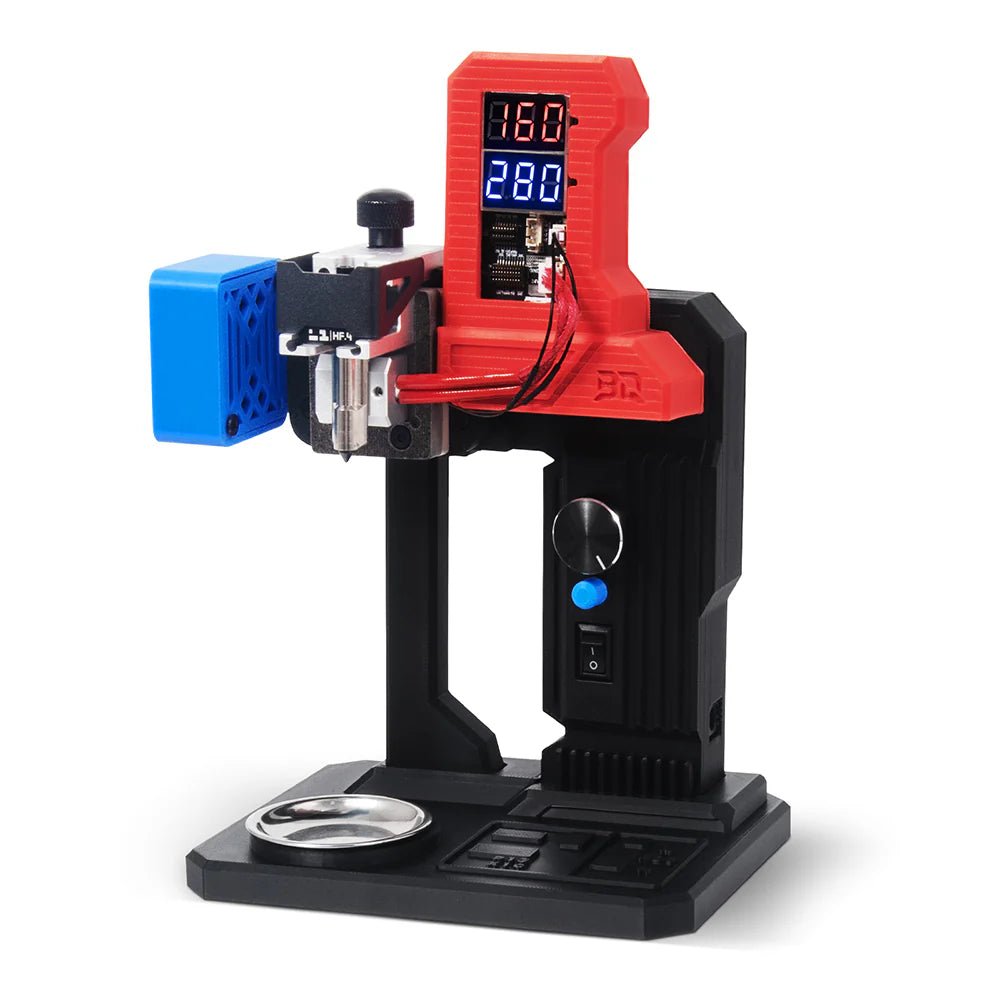
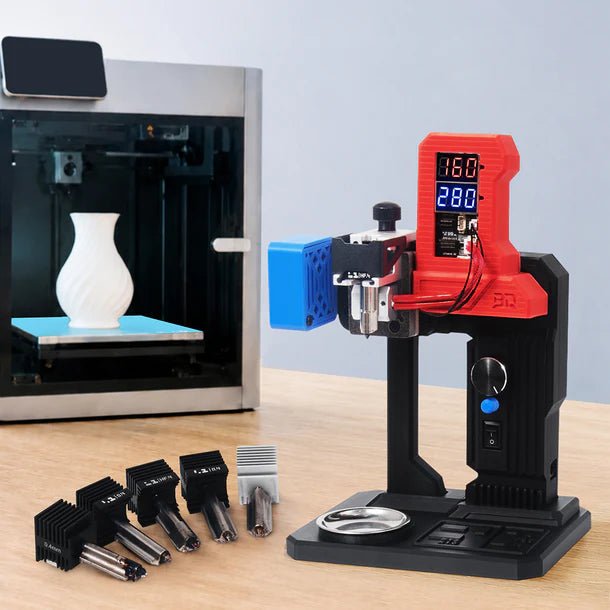
This compact desktop hotend maintenance station lets you remove a clogged Bambu-compatible hotend, secure it safely on your workbench, heat it to the appropriate temperature, and clear the blockage with full access from above or below. Instead of performing delicate hotend surgery inside a dark printer chamber, you can work at a comfortable angle where you can actually see what you are doing.
A radical concept, we know.
Swap the Hotend. Keep Printing. Deal with the Clog Later.
The Hotend Wizard is especially useful for print farms, businesses, schools, makerspaces, and anyone whose printer appears to clog only when a deadline is approaching.
Keep a spare hotend ready, swap out the clogged unit, and get the printer running again. The blocked hotend can then be repaired separately at your desk instead of keeping an expensive printer offline while you poke at it with increasingly creative tools.
This also allows multiple clogged hotends to be collected and serviced together—which is excellent news for anyone currently maintaining a drawer labeled “I’ll fix these someday.”
Controlled Heating up to 290°C
The Panda Hotend Wizard provides controlled heating up to 290°C, allowing it to soften and remove residue from everyday and higher-temperature printing materials.
Use the rotary control to select your target temperature in 5°C increments. The dual digital displays show both the current hotend temperature and the selected target temperature, so you can see when the hotend is ready for maintenance rather than relying on the highly scientific method of touching something near it and immediately regretting the decision.
The control system also supports automatic hotend detection, with selectable PID profiles for the Wizard’s heating module or original Bambu hotend heaters.
Clear Clogs from Either Direction
Once the hotend reaches temperature, the included cleaning needles can be inserted through the filament path or nozzle side to help loosen and remove the blockage.
Because the hotend is mounted outside the printer, you get:
- Better visibility
- Easier access to both ends of the filament path
- More comfortable working angles
- Less risk of damaging nearby toolhead wiring
- Fewer opportunities to drop a screw into the printer’s mysterious lower regions
The base includes a removable collection tray to catch softened filament and debris. Your workbench may still become covered in printer parts, filament samples, and half-finished projects, but at least the molten nozzle residue has somewhere specific to go.
Dedicated Fixtures for Compatible Bambu Hotends
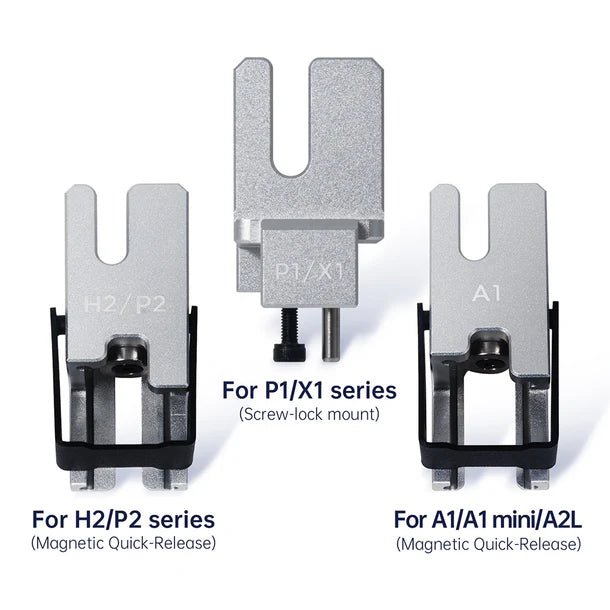
The Panda Hotend Wizard includes dedicated holders for several styles of Bambu-compatible hotends.
Officially listed compatibility includes:
- Bambu Lab A1
- Bambu Lab A1 mini
- Bambu Lab P1S
- Bambu Lab X1C
- Bambu Lab P2S
- Bambu Lab H2D
- Bambu Lab H2S
The H2C-Vortek system is not currently fully supported. Compatibility may vary by individual hotend position or configuration, so review BIQU’s current instructions before servicing H2C hotends.
P1 and X1-series hotends use their original built-in heating elements through the Wizard’s dedicated connection. Quick-swap hotends such as those used by the A1, P2, and supported H2 configurations are heated with the Panda Hotend Wizard’s separate heating module.
Do not power both heating systems at the same time. Two heaters are not twice as helpful in this particular situation.
Active Cooling and Safer Handling
A dedicated fan module provides controlled cooling during and after maintenance. The Wizard also includes protective finger guards, insulated contact areas, and a separate main power switch for immediate power cutoff.
If the unit is left without operation for 20 minutes, heating automatically shuts off to help prevent accidental overheating or prolonged dry heating.
It cannot stop you from walking away halfway through a project and forgetting why you entered the room, but it can at least stop heating the hotend.
Simple Knob-and-Button Controls
Operation is intentionally straightforward:
- Secure the hotend in the correct fixture.
- Connect the appropriate heater or hotend cable.
- Set the target temperature using the rotary knob.
- Allow the hotend to reach temperature.
- Clear the clog using the included needle.
- Cool the hotend before handling or reinstalling it.
- Return the hotend to service and pretend you were never considering throwing it away.
A double press quickly selects a 250°C target, while a long press turns off heating. The fan has its own dedicated control switch.
Built for Print Farms—and Everyone Who Prints Like One
For an occasional hobbyist, the Panda Hotend Wizard can help extend the life of hotends that might otherwise be discarded.
For a print farm or production environment, it can become part of a much more efficient maintenance workflow:
- Remove the clogged hotend
- Install a spare
- Return the printer to production
- Repair clogged hotends in batches
- Reduce printer downtime
- Recover usable hotends instead of replacing them automatically
At some point, a tool that saves several hotends—and keeps several printers operating—begins looking less like an unnecessary gadget and more like the item you wish you had bought before assembling the aforementioned drawer of shame.
Key Features
- Standalone desktop hotend repair and unclogging station
- Designed for compatible Bambu Lab hotends
- Heating temperature adjustable up to 290°C
- Temperature adjustment in 5°C increments
- Dual displays show actual and target temperatures
- Automatic hotend detection
- Selectable PID profiles
- Dedicated fan cooling module
- Clear heating and fan status indicators
- Access to both the filament inlet and nozzle outlet
- Dedicated hotend mounting fixtures
- Included unclogging needles
- Removable debris collection tray
- Independent main power switch
- Automatic heating shutdown after 20 minutes without operation
- Compact workbench-friendly design
- Helps reduce hotend waste and printer downtime
- Excellent for print farms, schools, workshops, and frequent printers
Technical Specifications
- Input voltage: 24V DC
- Input current: 5A
- Built-in heater power: 100W
- Maximum output power: 110W
- Maximum temperature setting: 290°C
- Maximum operating current: 5A
- Standby power: 0.1W
- Temperature adjustment: 5°C increments
- Control: Rotary knob and dedicated switches
- Display: Separate actual- and target-temperature displays
What’s Included
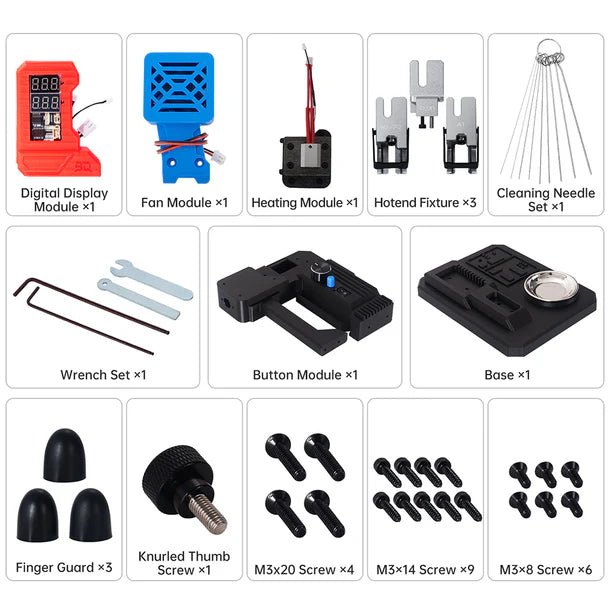
- Panda Hotend Wizard digital display module
- Fan module
- Heating module
- Three hotend holders
- Cleaning needle set
- Wrench set
- Button and control module
- Base with collection tray
- Three protective finger guards
- Knurled retaining screw
- Assembly hardware
A compatible 24V 5A power adapter is required (sold separately)
Important Safety Information
The Panda Hotend Wizard works with components heated to temperatures capable of causing serious burns.
Always:
- Use the correct fixture for the hotend
- Confirm the proper heating connection before applying power
- Never power the Wizard heating module and a hotend’s built-in heater simultaneously
- Keep hands clear of the heater, nozzle, and molten filament
- Allow components to cool before removal or installation
- Keep the unit away from children and combustible materials
- Switch off and disconnect power after maintenance
- Follow BIQU’s instructions for your specific hotend
The Wizard is designed to make hotend maintenance easier. It does not make 290°C less hot.